

Biometric access control
The door knows
your members.
Put a face, fingerprint or palm terminal on your gym door and run it entirely from the REPZ app. Every punch becomes an attendance record, and an expired membership stops opening it, with a grace period you choose.
Sooryan
REPZ-100017
Access granted · door open
Membership active
Monthly · 24 days remaining
Refuse entry when expired
Days of grace
−3+One walk-up, start to finish.
Scroll, and the terminal keeps up: looking, matching, checking the membership, opening, or refusing when the plan ran out.
Sooryan
REPZ-100017
Looking…
Membership active
Monthly · 24 days remaining
Refuse entry when expired
Days of grace
−3+Sooryan
REPZ-100017
Looking…
Membership active
Monthly · 24 days remaining
Refuse entry when expired
Days of grace
−3+01 · At the door
A member walks up.
Face, finger or palm, whatever your terminal supports. No phone out, no queue, nobody at the desk.
02 · Recognised
The door knows who it is.
The terminal matches them in under a second and shows their name and photo on its own screen.
03 · Membership checked
REPZ checks the membership.
Active, expiring, or expired: the answer comes from the same record your renewals live in.
04 · Let in
The door opens.
Attendance is marked the moment they walk through, and check-out follows on the way out.
05 · Or not
Expired means expired.
A membership that ran out and is past its grace period stops opening the door. The attempt is still recorded.
06 · Your call
You decide how strict the door is.
Refuse entry on expiry, or leave it open and have the conversation at reception. Set a grace period from 0 to 90 days.
Four ways in
Face, finger, palm or card.
Whichever the terminal on your door actually supports. REPZ knows each device's capabilities and only offers what that machine can do.
Face
The camera recognises them as they walk up. Their photo and name appear on the terminal screen.
Fingerprint
A finger on the pad and they're in. Enrol it from their profile, and the terminal asks them next time.
Palm
Contactless, and it works on hands that a fingerprint reader argues with. Chalk included.
Card
For members who'd rather tap something, and for staff who need a fallback at the door.
Run it from your phone
All the data you add in REPZ goes straight to the device.
Enrol, push, block, unblock and remove, all from a member's profile, on your phone, without walking to the door.
Push to the device
Add a member once, and the door already knows them.
Everything you enter in REPZ, meaning the member's record, their photo and their access rights, is pushed straight to the biometric device. No exporting, no second system, and nobody typed in twice.
- Their record sent to the terminal, with a Resend if you need it
- Their photo on the terminal screen in one tap
- A code that is never reused, so nobody inherits a departed member's attendance
Sooryan
Device ID 100017
Record
Sent to the terminal
Photo
Shown on the terminal screen
Credentials
Face
Not set · tap to enrol at the device
Fingerprint
Enrolled · 2 fingers
Palm
Not set · enrol at the device
A pushed photo is not a face template. Face recognition still needs the member in front of the camera. REPZ never pretends otherwise.
Automatic sync
Nobody presses a Push button.
Register somebody at the desk and they can walk straight to the door and enrol. A new member or a new hire is sent to the terminal the moment their record is saved, and a changed name or photo goes on save, so the door is never a day behind the app.
- Only outlets that actually have a terminal ever make the call
- The push follows a saved record, so registering a member can't hang on a rebooting Windows box
- Only what the device holds is re-sent: a blood group edit never re-uploads a photo
- Anything the terminal refused shows up on a sync job list to retry
On save
Member saved at the desk
Sooryan · Monthly · paid
Sent to Main door
Device code 100017 allocated
Access decided in the same breath
Active plan · door will open
No sync screen. No Push button. Nobody remembering.
Your team at the door
Staff punch on the same terminal.
Trainers and counter staff are pushed to the device exactly as members are, and their punches land in the staff attendance register rather than in your members' numbers. Take somebody off the roster and the door stops opening for them.
- Deactivation blocks them at the door instead of deleting their enrolment
- Put them back and their access returns instantly
- Delete them for good and their device code goes with them, so no face is left behind
Devices
0 members on device
Main door
· KakkanadOnlineLadies entry
· KakkanadOnlineTurnstile
· EdappallyOfflineA terminal that loses its internet sends its backlog on reconnect, and the punches land at the time they actually happened.
Manage member access
Expired means expired, if you want it to.
Refuse entry once a membership expires, as a switch you turn on or off. Leave it off and the door still opens while the visit is recorded, for gyms that want the conversation at reception rather than a locked turnstile.
- Grace period from nought to ninety days
- Renewing lets them back in automatically, the moment payment lands
- Block or unblock one member individually, with a reason
Expired memberships
Refuse entry when expired
Expired members still get in · punch recorded
Days of grace
Refused 0 day(s) after expiry
Currently blocked · 3
Re-apply accessA name and a reason, never just a count. Renewing lets them back in automatically, the moment the payment lands.
Attendance
A punch is just a check-in.
Biometric punches sit alongside QR self check-in and staff marking on the same screens, so attendance percentages, member history and today's count all work without anybody learning a new report.
- Check-out on the way out, three-hour auto-close
- Double-touches ignored, not read as an instant check-out
- Every punch kept even when it matches nobody
Wed, Aug 12
Attendance · every way in, one register
Double-touches are ignored, not read as an instant check-out. Auto check-out after three hours, same as everything else.
Your devices
More than one door, more than one branch.
See which terminals are online, when each was last seen, and when it last took a punch. REPZ reads each device's own capabilities and only offers what that machine can actually do.
- Several devices per door, several doors per outlet
- A separate set per outlet, for chains
- A terminal that lost its internet sends its backlog on reconnect
Devices
0 members on device
Main door
· KakkanadOnlineLadies entry
· KakkanadOnlineTurnstile
· EdappallyOfflineA terminal that loses its internet sends its backlog on reconnect, and the punches land at the time they actually happened.
On a member's profile
One page for everything the door knows.
What the device holds, what it's still missing, when they last punched, and whether they can open the door right now, all on the member you were already looking at.
- Enrolment status per credential, honestly separated
- Last punch, with the device it came from
- Blocked on the device, as a switch with a reason
- Remove from every terminal when they leave
Biometric data
On the device
Device ID
100017
Record
Sent to the terminal
Photo
Shown on the terminal
Credentials
Fingerprint
Enrolled · 2 fingers
Face
Not set · tap to enrol at the device
Palm
Not set · enrol at the device
A pushed photo is not a face template. Face recognition needs the member in front of the camera.
Access
Blocked on the device
They can open the door
Remove from the device
Deletes their record and templates from the terminal
Attendance, unchanged
A year of a member's attendance, however they got in.
Yearly visit counts, monthly graphs per member, and every session's check-in and check-out times with the duration worked out, whether the visit came from the terminal, the QR, or a staff member marking the register.
Hari · attendance history
Last 12 months
0
visits
Behind it
You never see a device configuration screen.
Setup, registration and discovery done once, by whoever installs the hardware
Every push, enrolment and block logged with what the terminal replied
Punch traffic authenticated and encrypted end to end
Member codes never reused, so attendance is never inherited
Works with the face and fingerprint terminals Indian gyms already buy
Compatible with eSSL and ZKTeco push-protocol devices
On a real door
Already open, already counting.
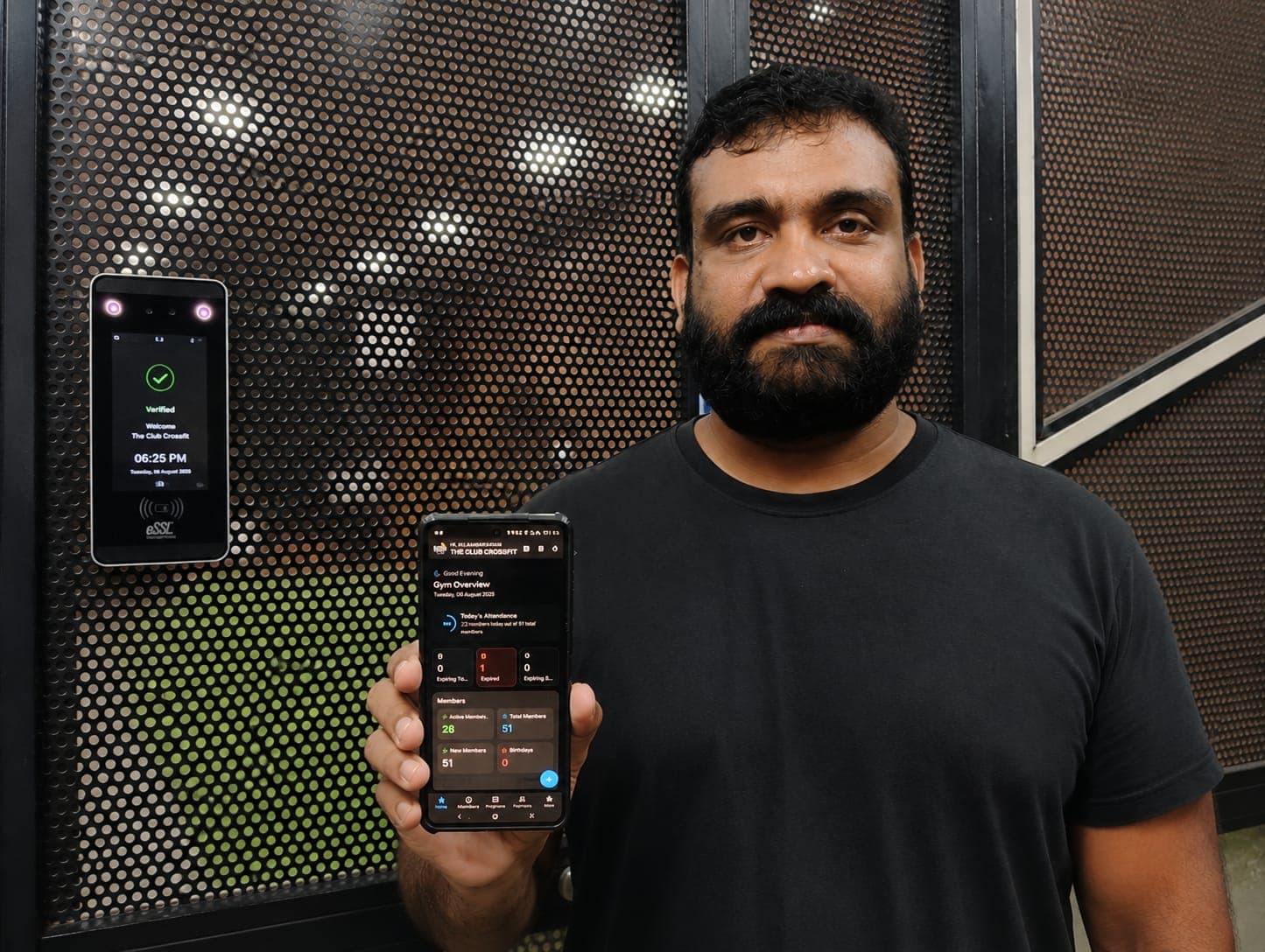
The device on the door was the part I expected to be complicated. I add a member's face from the app, their punch turns into attendance on its own, and an expired membership stops opening the door. Nobody has to sit at the desk checking who walks in.

Riju Rajendran
Owner, The Club Crossfit
FAQ
Biometric questions.
Which biometric devices does REPZ work with?+
REPZ works with the standard push-protocol biometric terminals Indian gyms already buy, including eSSL and ZKTeco face, fingerprint and palm devices, including the AIFace family and the older fingerprint units. REPZ reads each device's own capabilities and only offers what that machine can actually do, so a fingerprint-only unit never shows a face-enrolment button. If you already have a compatible terminal on your door, we connect to that rather than selling you another one.
Can I push my REPZ member data straight to the biometric device?+
Yes, and that is the whole design. Every member you add in REPZ can be pushed to the biometric device from the app: their record, their photo for the terminal screen, and their access rights. You enrol a fingerprint, face or palm from their profile and the terminal asks them for it the next time they walk up. Nothing is exported to a spreadsheet, nothing is typed twice, and nobody walks to the door with a laptop.
Do I have to remember to sync new members to the device?+
No, and there is no sync screen to forget. A new member or a new staff member is pushed to the terminal the moment their record is saved, and an edited name or photo is pushed on save, so somebody registered at the desk can walk straight over and enrol. Three rules keep that safe: only outlets that actually have a terminal ever make the call, so a gym without biometrics pays nothing for the feature; the push happens after the record is safely saved and swallows its own failures, so registering a member can never hang because a Windows box is rebooting; and only what the device actually holds is re-sent, so editing somebody's blood group does not re-upload a photo over your broadband. Anything the terminal refused appears on a sync job list to retry.
Can staff punch in on the same biometric device?+
Yes. Staff are pushed to the terminal exactly as members are, and their punches land in the staff attendance register rather than in your members' attendance percentages, which is why that register is kept separate. Taking somebody off the roster blocks them at the door rather than deleting them, so their enrolment survives and putting them back restores access instantly. Deleting a staff member for good removes them from the terminal outright, with their device code captured before the record goes, so a face that still opens the door for somebody who left is never left behind.
Does face recognition attendance need the member's phone?+
No. The terminal at the door does the recognising, so members need nothing on them at all: no phone, no card, no app open. The punch becomes an ordinary attendance record in REPZ with check-in and check-out times, and the same three-hour auto-close as every other kind of check-in.
Can REPZ block expired members at the gym door?+
Yes. Turn on 'refuse entry when expired' and an expired member's finger or face stops opening the door, while the attempt is still recorded so you know they came. Set a grace period between 0 and 90 days. With 3 days of grace, a plan that ran out on Monday still works until Thursday. Renewing a member re-opens the door automatically the moment the payment lands.
How do I know who is currently locked out?+
There is a screen for exactly that, and it names people rather than counting them. Every blocked member appears with the reason they're blocked, anybody blocked who should no longer be gets flagged, and one tap on Re-apply access clears them all at once.
Is a member's photo the same as a face template?+
No, and REPZ never pretends otherwise. Pushing a photo puts a picture on the terminal's screen so staff can see who just punched. Face recognition needs a template collected by the camera with the member standing in front of it. Enrolment status is shown per credential, honestly separated, so you always know which of the two you actually have.
What happens if the terminal loses its internet connection?+
It keeps reading and stores the punches. When it reconnects it sends the backlog, and the punches land in REPZ at the time they actually happened rather than the time they arrived. Every push, enrolment and block is logged with whatever the terminal replied, so 'we asked' and 'it happened' stay separate, answerable facts.
Which REPZ plan do I need for biometric access?+
Any of them. Biometric access control is included on Basic at ₹599 a month, exactly as it is on Early Adopter. The door is not an upsell. Ultimate and Early Adopter add several devices per door and several doors per outlet, for gyms with more than one entrance or more than one branch. The terminal itself is a one-off hardware cost we quote for your door, and REPZ support installs and registers it.
Is the punch data secure?+
Punch traffic between the terminal and REPZ is authenticated and encrypted end to end. Each member sits on the device under a code that is never reused, so a new member can never inherit a departed member's attendance history. Setup, device registration and discovery are done once by whoever installs the hardware, so the credentials never live on a staff member's phone.
Put it on your door.
Tell us what your entrance looks like and we'll tell you which terminal fits, what it costs, and how fast it goes in.